
SpiralCity V0: read user input in Rust, and why I should read the docs

New year, new life, new project… What is it?
These last months have been very busy with my new job as a Data Scientist at Enedis (the French electricity distribution network). Lots of things to learn, a lot of Python and SQL, new colleagues, finding my new daily rhythm adapted to my schedule, while continuing my knee rehabilitation…
But my goal in the next years is still to find a job as a Software Engineer to change from being a Data Scientist. So in my free time, I continued to work on my programming skills. I mainly did some Advent Of Code (here is my GitHub repo for my solutions). Ultimately, I’d like to collect all stars, but it’s taking time. So after finishing years 2025 and 2017 in AoC, I felt I needed a change.
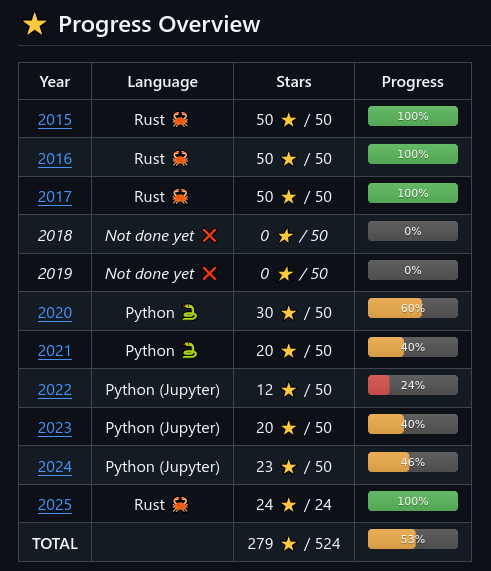
I’ve discovered it in 2020 but this summer, I used years 2015 and 2016 to learn Rust.
Moreover, AoC is great for training problem-solving and classical algorithms (like path-finding), but it did not teach me how to deal with a real project. So I looked for a small project idea that would at the same time be not too overwhelming, but that could also be developed enough if I don’t get bored with it. Something a bit more ambitious than Rustbot, but also enjoyable and engaging from the start.
So, with zero originality, I decided to create a video game (in 🦀 Rust, of course. This way, I won’t have to rewrite it in Rust later).
The idea of 🌀 SpiralCity is a city builder, but you don’t choose where to put the new building. At each step, you can choose between 2 buildings (probably 3 in the future), and the one you choose is automatically placed at the next place in a grid, where you start at (0, 0) and then progress in spiral (next: (1, 0), then (1, -1)…). The buildings have a cost and produce some resources, and can affect the neighbouring buildings (with bonuses or maluses). In the very first version, it will be played in terminal using emojis, and with only 4 kinds of buildings.
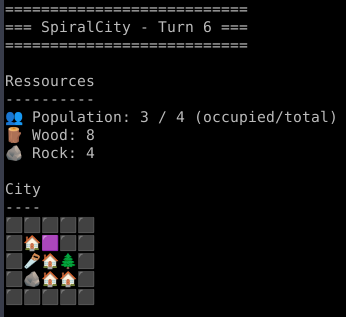
🏠 = House | 🌲 = Forest | 🪨 = Quarry
🪚 = Workshop | 🟪 = next position
First steps
I started by creating some structs, some enums, some printing functions, but for a start no real logic.
Then I added the logic for getting the next coordinate. As it is a grid with negative coordinates (the first building is at (0, 0)), I used for storing a trick that I already used in AoC 2022 day 17 (see my solution) : a HashMap that maps coordinates to what they contain.
Note: while looking for the specific day where I used this trick, I discovered the command ripgrep, so I just had to do rg "HashMap<\s*(\s*i32\s*,\s*i32\s*)" -n in my AoC repository to get the following result:
2017/src/day22.rs
58:fn parse(raw_input: &str) -> HashMap<(i32, i32), Node> {
123:    start_grid: &HashMap<(i32, i32), Node>,
154:    example: &HashMap<(i32, i32), Node>,
156:    input: &HashMap<(i32, i32), Node>,
174:    start_grid: &HashMap<(i32, i32), Node>,
206:    example: &HashMap<(i32, i32), Node>,
208: input: &HashMap<(i32, i32), Node>,Until this point, there was not really anything new from what I had already been doing previously in Rust.
Then it was time for some interactivity and start implementing a game turn.
I started with a function that randomly chooses 2 buildings between the 4 existing ones, and proposes them to the player. The player now has to choose one of them (or quit).
Read user input in Rust
Surprisingly, I never had to do that before. In AoC, you always read from an input file, so there is no interactivity. So I dived into io::stdin().
According to the docs, the function read_line() writes into a previously declared String buffer. It can be surprising (why not returning a String?), but I had already seen similar behaviours in C, so I was not surprised. I guess it allows the user to pre-declare it conveniently, allowing the user to handle the allocation however they please. The return type is io::Result<()>, so it can return an error. I did not dive too deep there at first and did some pretty complicated code to check this first:
let mut buffer = String::new();
let mut res = io::stdin().read_line(&mut buffer);
while res.is_err() {
    println!("Please enter a correct line");
    res = io::stdin().read_line(&mut buffer);
}
loop {
    println!("buffer: {buffer}");
    match buffer.trim() {
        "1" => return Some(building1),
        "2" => return Some(building2),
        "Q" => return None,
        "q" => return None,
        _ => {
            println!("Please enter a correct value: '1', '2' or 'Q'");
            res = io::stdin().read_line(&mut buffer);
            while res.is_err() {
                println!("Please enter a correct line");
                res = io::stdin().read_line(&mut buffer);
            }
        }
    }
}Then I found out here that it can probably not return an error because of the user input. So I simplified and used some unwraps:
let mut buffer = String::new();
loop {
    io::stdin()
        .read_line(&mut buffer)
        .expect("Expected first user input");
    match buffer.trim() {
        "1" => return Some(building1),
        "2" => return Some(building2),
        "Q" => return None,
        "q" => return None,
        _ => println!("Please enter a correct value: '1', '2' or 'Q'"),
    }
}The thing is… it was working strangely. Most of the time, it was ok, but as soon as the user entered a value other than the four expected ones, it kept looping with the error message Please enter a correct value: '1', '2' or 'Q', even when entering a good value afterwards.
So I decided to print the buffer before the match:
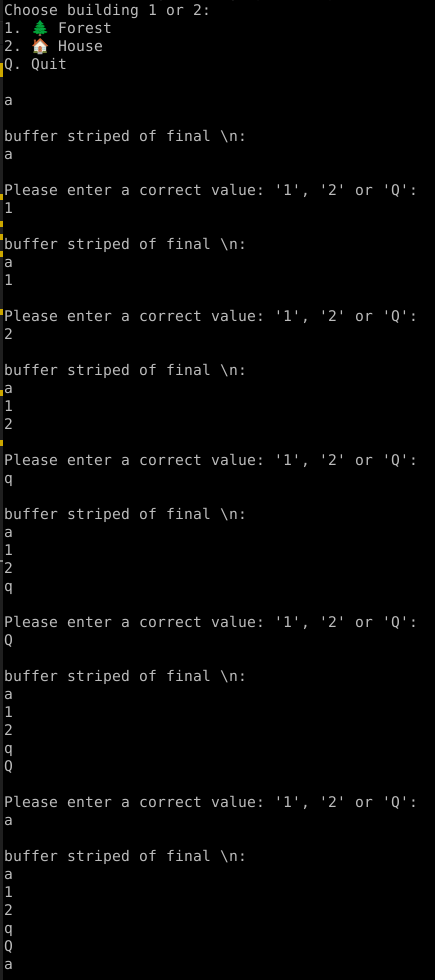
It took me some time but I then realized that contrarily to what I expected, the buffer was not cleared. To my defense, this isn’t explicitly stated in the documentation example I used. But I could have easily checked it by looking at the definition of the read_line() function:
// In src/rust/library/std/src/io/stdio.rs, line 411

#[stable(feature = "rust1", since = "1.0.0")]
#[rustc_confusables("get_line")]
pub fn read_line(&self, buf: &mut String) -> io::Result<usize> {
    self.lock().read_line(buf)
}


// line 567

fn read_line(&mut self, buf: &mut String) -> io::Result<usize> {
    self.inner.read_line(buf)
}


// In src/rust/library/std/src/io/mod.rs, line 2581

#[stable(feature = "rust1", since = "1.0.0")]
fn read_line(&mut self, buf: &mut String) -> Result<usize> {
    // Note that we are not calling the `.read_until` method here, but
    // rather our hardcoded implementation. For more details as to why, see
    // the comments in `default_read_to_string`.
    unsafe { append_to_string(buf, |b| read_until(self, b'\n', b)) }
}Here it is!
append_to_string, ha ha.
So, I just need to clear the buffer before writing again, and my function becomes:
let mut buffer = String::new();
loop {
    io::stdin()
        .read_line(&mut buffer)
        .expect("Expected first user input");
    match buffer.trim() {
        "1" => return Some(building1),
        "2" => return Some(building2),
        "Q" => return None,
        "q" => return None,
        _ => println!("Please enter a correct value: '1', '2' or 'Q'"),
    }
    buffer.clear();
}And now: it works!
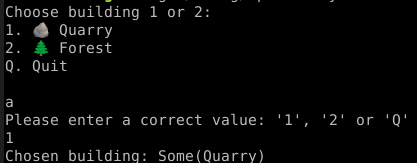
Side note: I did not include it in the code I copied from stdio, but I must say it is very comfortable to read Rust source code, as it is very well documented. So in the future I’ll try to do it more often, rather than looking for some solutions online.
In fact, I could have seen it immediately in the comments of the read_line() function:
// In src/rust/library/std/src/io/stdio.rs, line 378:

/// Locks this handle and reads a line of input, appending it to the specified buffer.
///
/// For detailed semantics of this method, see the documentation on
/// [`BufRead::read_line`]. In particular:
/// * Previous content of the buffer will be preserved. To avoid appending
///   to the buffer, you need to [`clear`] it first.
/// * The trailing newline character, if any, is included in the buffer.
///
/// [`clear`]: String::clearBonus: you can’t match a String
Before this, I ran into another problem when I was trying to match my buffer String. I was doing the following:
match buffer {
	"1".to_string() => return Some(building1),
	"2".to_string() => return Some(building2),
	"Q".to_string() => return None,
	"q".to_string() => return None,
	_ => {
		println!("Please enter a correct value: '1', '2' or 'Q'");
		res = io::stdin().read_line(&mut buffer);
		while res.is_err() {
			println!("Please enter a correct value: '1', '2' or 'Q'");
			res = io::stdin().read_line(&mut buffer);
		}
	}
}Which gave me the error:
error: expected a pattern, found an expression
--> src/main.rs:176:13
|
176 | "1".to_string() => return Some(building1),
| ^^^^^^^^^^^^^^^ not a pattern
|
= note: arbitrary expressions are not allowed in patterns: <https://doc.rust-lang.org/book/ch19-00-patterns.html>
help: consider moving the expression to a match arm guard
|
176 - "1".to_string() => return Some(building1),
176 + val if val == "1".to_string() => return Some(building1),So I tried:
match buffer {
	"1".to_string() => return Some(building1),
	"2".to_string() => return Some(building2),
	"Q".to_string() => return None,
	"q".to_string() => return None,
	_ => {
		println!("Please enter a correct value: '1', '2' or 'Q'");
		res = io::stdin().read_line(&mut buffer);
		while res.is_err() {
			println!("Please enter a correct value: '1', '2' or 'Q'");
			res = io::stdin().read_line(&mut buffer);
		}
	}
}
Which gave me the error:
error[E0308]: mismatched types
   --> src/main.rs:176:13
    |
175 |         match buffer {
    |               ------ this expression has type `String`
176 |             "1" => return Some(building1),
| ^^^ expected `String`, found `&str`And I also tried:
match buffer {
	String::from("1") => return Some(building1),
	String::from("2") => return Some(building2),
	String::from("Q") => return None,
	String::from("q") => return None,
	_ => {
		println!("Please enter a correct value: '1', '2' or 'Q'");
		res = io::stdin().read_line(&mut buffer);
		while res.is_err() {
			println!("Please enter a correct value: '1', '2' or 'Q'");
			res = io::stdin().read_line(&mut buffer);
		}
	}
}Which gave me the error:
error[E0164]: expected tuple struct or tuple variant, found associated function `String::from`
   --> src/main.rs:176:13
    |
176 |             String::from("1") => return Some(building1),
    |             ^^^^^^^^^^^^^^^^^ `fn` calls are not allowed in patterns
    |
    = help: for more information, visit https://doc.rust-lang.org/book/ch19-00-patterns.html
So after some research, I found this: Stack Overflow – How to match a String against string literals?
And the answer was to do match buffer.as_str() (which I did not use in the end because when I trim the final \n, it returns me a &str and not a String).